

In this guide, we explain how to purchase VFX tokens through the presale, explore the project’s forex-to-crypto infrastructure utility, and cover key considerations for potential investors.
If you’re looking to buy VFX tokens, you’ll have to do so directly via the official presale website. VFX is not available on major exchanges (Coinbase, Binance) as it’s still in its presale phase.
You can buy using crypto (ETH, USDT, USDC) or a credit/debit card. First, make sure you are on the right site, vfxdapp.io, as scammers often create fake sites with similar URLs.
VFX is a utility token that connects forex markets to crypto infrastructure, acting as an interface layer between traditional currency markets and decentralized systems. The project team is positioning the token as being built for traders and capital allocators who are looking for practical utility.
Quick Steps to Buy VFX
Set up a compatible crypto wallet
Fund your wallet or choose card payment
Visit the official presale website
Connect your wallet
Select payment method and confirm purchase
How to Buy VFX – Step-by-Step Guide
Buying VFX during the presale is easy when you know how it works. Here’s everything you need to do exactly.
Step 1: Choose and Set Up Your Wallet
You’ll need a compatible crypto wallet to participate in the VFX presale. MetaMask or Trust Wallet are the most popular options, and both work great for beginners.
For MetaMask (browser extension):
Go to metamask.io and install the Chrome, Firefox, or Brave browser extension
Click “Create a Wallet” and ensure the password is difficult to guess
You will be given a recovery phrase containing 12 words. Write this down on paper and store it in a safe location. Never share this phrase with anyone or digitize it
After setup, you’re ready to start using the wallet
For Trust Wallet (mobile):
Download the official app from App Store or Google Play
Open the app and click on “Create a new wallet“
Note down your recovery phrase and keep it safe
Finish the verification process
You now have an active wallet
Both wallets let you easily switch between the Ethereum and BNB Chain networks as needed, depending on which blockchain you will be making your purchase.
Step 2: Fund Your Wallet
If you’re paying with crypto, you’ll need to fund your wallet first. The easiest way to do that depends on whether you already own any cryptocurrency.
If you already have crypto:
Open your wallet and copy your wallet address
Go to your exchange (Coinbase, Binance, etc.) and navigate to the withdrawal section
Paste your wallet address and select the right network (Ethereum for ETH/USDT/USDC, or BNB Chain for BNB)
Ensure the network matches your wallet settings
Confirm the withdrawal and wait for the transfer to complete (usually 5-15 minutes)
If you’re new to crypto:
You can actually buy crypto right in your wallet with a debit/credit card
MetaMask and Trust Wallet have their own built-in buying feature
Alternatively, if you already hold ETH, BTC, USDT, or USDC in a wallet you control, buy on an exchange and transfer it to your wallet
IMPORTANT: If you are using ETH, USDT, or USDC for the purchase, ensure you have some extra ETH in your wallet (about $20-50) to cover gas fees. Gas fees are transaction costs on the Ethereum network and should be included in your VFX budget.
Step 3: Go to the Official Presale Website
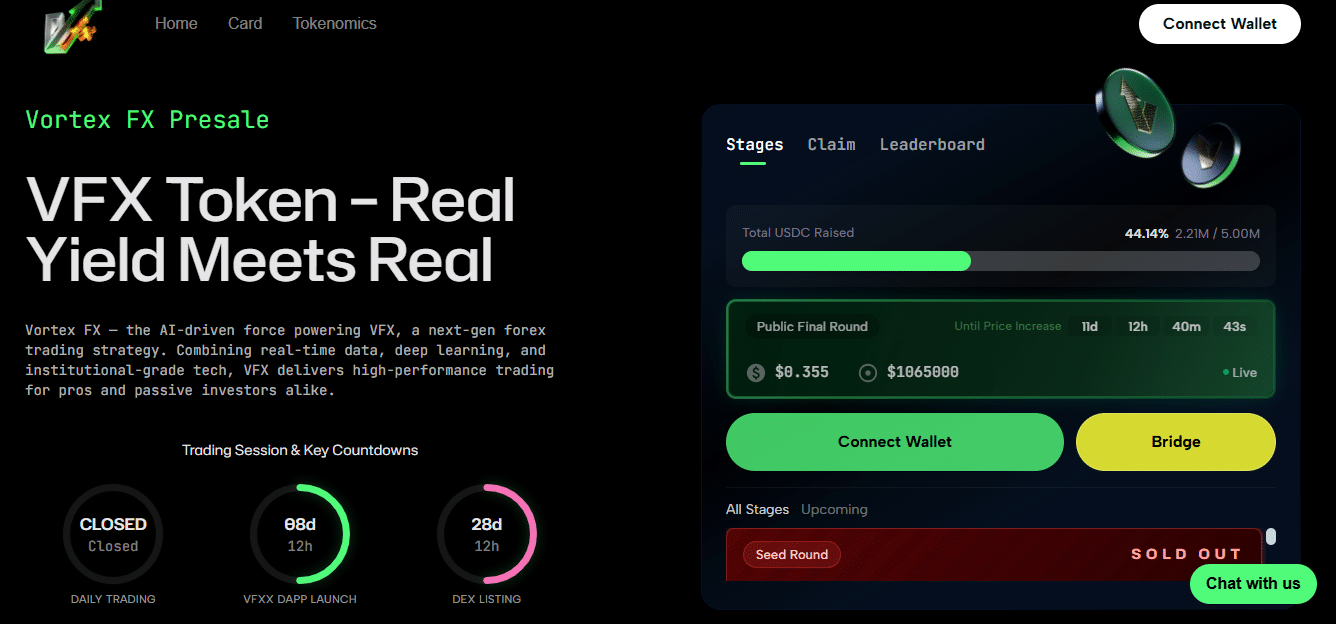
Vortex FX presale homepage showing the amount raised so far. Source: Vortex FX
Go to vfxdapp.io and visit the presale dashboard. Ensure you are on the correct URL, as scammers sometimes create fake websites that look identical to real ones.
What the official website will tell you:
What’s the current presale stage
Amount raised until now
Token price in the ongoing stage
Payment options
Wallet connection button
Step 4: Connect Your Wallet
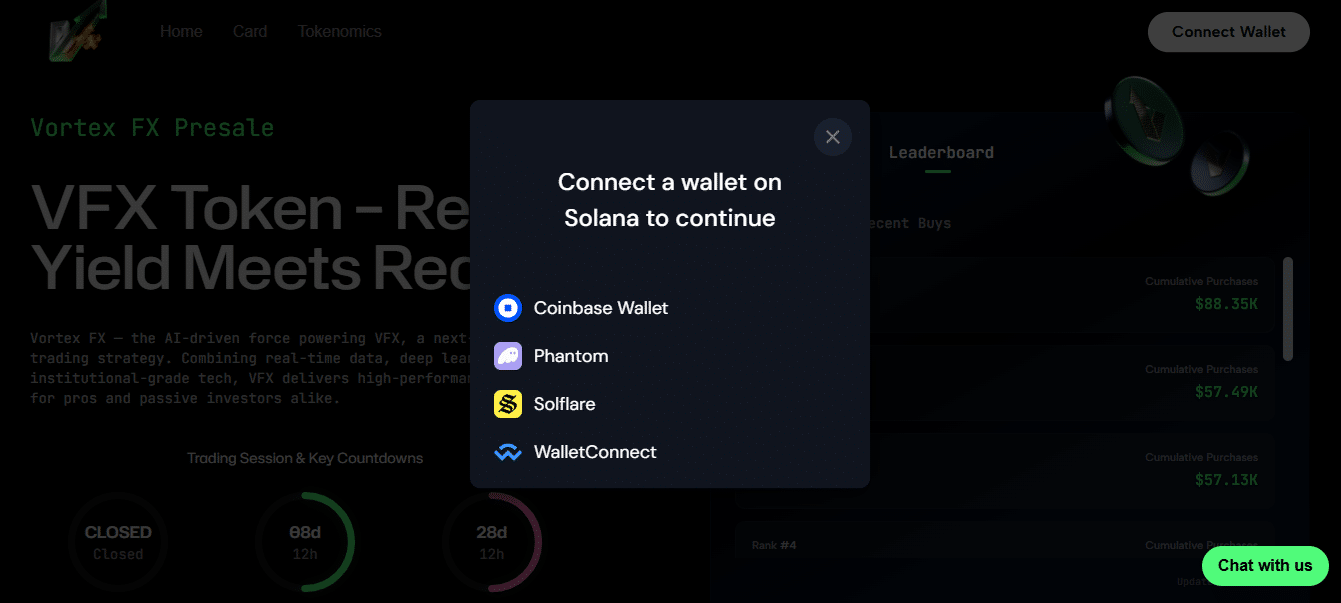
You will be prompted to connect a wallet on Solana to continue your purchase. Source: Vortex FX
Click the “Connect Wallet” button on the presale page. A pop-up will appear with the wallet option you have set up: Coinbase Wallet, Wallet Connect, MetaMask, or other options.
Your wallet will ask for permission to connect to the website. Read through the prompt and give it access. You should now see your wallet address shown on the presale dashboard, indicating that you are connected.
If you are on mobile using Trust Wallet, you may need to use their in-app browser to open the presale website. Open the Trust Wallet, click the Browser tab, then enter the presale URL.
Step 5: Choose Your Payment Method
You will see several payment methods on the presale dashboard. Choose the one that suits you best:
ETH: Fastest and easiest if you are already on ETH. No need to change networks
USDT or USDC: Good option if you want to avoid ETH price fluctuations. Still requires ETH for gas
BNB: Available if you’d like to pay with BNB Chain. But first, ensure your wallet is configured on the BNB Chain network
Credit/Debit Card: You can buy it directly with Fiat Currency using an integrated payment provider
Step 6: Purchase Amount
Enter the amount you’d like to spend. The dashboard will auto-calculate how many VFX tokens you will receive based on the current presale price. Review the details, including the amount you’re spending, the number of VFX tokens you’ll receive, and the gas fees (if applicable).
Step 7 – Verify Transaction
Click the “Buy” or “Confirm” button. Your wallet will open a transaction approval window showing the amount being sent, the presale contract address, and the estimated gas fee. Review everything carefully. If it looks correct, click “Confirm” in your wallet.
Step 8: Wait for Confirmation
The transaction will process on the blockchain. This may take:
BNB Chain: 5-30 seconds
Ethereum: 30 seconds to 2 minutes
You will see the ‘Transaction pending’ message. When it’s confirmed, you will receive a success notification. The presale dashboard will refresh and update with the amount of VFX tokens you purchased.
In the case of Credit Card Purchases:
Select “Credit/Debit Card” as your payment method
Enter the amount you’d like to spend in USD or your local currency
You’ll be redirected to a payment provider (usually Transak or MoonPay)
Complete their KYC verification (ID upload, selfie)
Enter your card details and verify the payment
Tokens will be transferred to your connected wallet address
Fees are typically higher for card purchases (3-5%), but it’s more convenient, especially if you don’t have any cryptocurrency yet.
Supported Payment Methods
Knowing more about your payment options will help you select the most economical one.
ETH (Ethereum): Most direct if you are already on the Ethereum network. You will need to pay gas fees, which vary depending on network congestion. During busy times, gas can cost $10-30 per transaction. Be sure to check current gas prices before buying.
USDT (ERC-20): A stablecoin pegged to the US dollar. Good choice if you want to avoid price volatility while making your purchase, but you still need ETH in your wallet for gas.
USDC (ERC-20): Same as USDT. Another dollar-pegged stablecoin with the same stability advantages.
BNB (BEP-20): If you switched your wallet to BNB Chain only. Gas fees on BNB Chain are much cheaper (usually under $1), but you have to use a completely different network.
Credit/debit cards: Cards are an easy option for anyone new to crypto. You’ll need to complete KYC verification, but otherwise you won’t have to set up any exchange accounts or make any crypto transfers.
Where to Buy VFX?
VFX is only available on the official presale website. This means you cannot buy VFX on cryptocurrency exchanges like Binance, Coinbase, Kraken, or KuCoin yet. The token has not been launched on public markets and third-party marketplaces; DEXs will not have access to it either. You must use a compatible crypto wallet and connect it to the presale platform.
Which Wallets Can You Use to Buy VFX?
MetaMask – Fully supported. Can be used as a browser extension or mobile app, mainly for desktop users
Trust Wallet – Fully supported. Mobile-first wallet with built-in dApp browsing capabilities
Best Wallet – Supported. Multi-chain wallet with additional features for presale participants
Wallet Connect-compatible wallets – Most modern wallets that support the WalletConnect protocol should work
Like any crypto presale, you need wallets for the VFX presale. Unlike centralized exchanges, which hold your assets, VFX presales send the tokens directly to a wallet address you control. This means you need to handle your security and recovery phrases.
Before You Buy VFX – Key Information
| Detail | Info |
| Token Symbol | VFX |
| Presale Price | Varies by stage (check current stage on website) |
| Presale Stage | Multiple stages with increasing prices |
| Blockchain | Ethereum / BNB Chain |
| Payment Options | ETH, USDT, USDC, BNB, Credit/Debit Card |
| Claim Date | After Token Generation Event (TGE) |
| Staking | Available with APY rewards |
Can You Buy VFX on Coinbase, Binance, or Other Exchanges?
No, not during the presale. VFX is only obtainable via the official presale website for now. Listings on crypto exchanges may occur after the TGE, but they are not guaranteed.
Most presale tokens end up listing on DEXs such as Uniswap or PancakeSwap, and eventually on centralized exchanges if there’s high demand and liquidity.
More info on exchange partnerships from the project will come closer to the VFX launch date, but for now, the presale is your only option.
Can I Buy VFX with a Credit Card?
Yes, the VFX presale accepts credit and debit card purchases via integrated fiat payment providers. This is a good option if you do not already own crypto or don’t want to fund a wallet.
Here’s how it works: when you click the card payment option, you’ll be redirected to a third-party service like Transak or MoonPay. They handle the fiat-to-crypto conversion and send the tokens to your wallet address.
You need to complete KYC (Know Your Customer) verification, usually by providing a government ID and a selfie. This takes a few minutes, but could take longer during busy times.
Card purchases incur a fee of 3% to 5% of the purchase amount, plus any fees your card issuer charges for cryptocurrency purchases. Some banks block crypto transactions, so if a payment is declined, call to authorize it.
Can You Sell VFX Tokens?
Not during the presale period. VFX tokens are locked until the Token Generation Event, and you won’t be able to transfer, trade or sell them until they’re officially claimed after TGE.
After launch, your ability to sell depends on where VFX is listed. If it launches on a DEX like Uniswap, you can swap your tokens there. If it’s listed on centralized exchanges, you can sell through those platforms. Liquidity also matters; without trading volume, it won’t be easy to sell.
VFX is a newer crypto token, so there are still no assurances that it may perform well in the coming months and years. There are no guarantees that it will get listed or have good liquidity. Some presale tokens take time to build trading volume, while others go live with strong backing. Uncertainty is always part of the game when you’re getting into tokens this early.
What Is VFX Token?
VFX Token is an interface layer that bridges the gap between traditional forex markets and cryptocurrency infrastructure. According to the project, VFX tokens aren’t intended to disrupt or replace the current $7+ trillion daily forex market. Instead, the tokens operate as a dual-track alongside two parallel financial systems that have traditionally been kept apart.
The token powers interactions across a platform that blends traditional finance discipline with crypto-native innovation. It’s currently in its presale phase and not yet available on public exchanges.
Learn more about the project’s vision, tokenomics, and roadmap on the VFX ICO page.
VFX Token Distribution
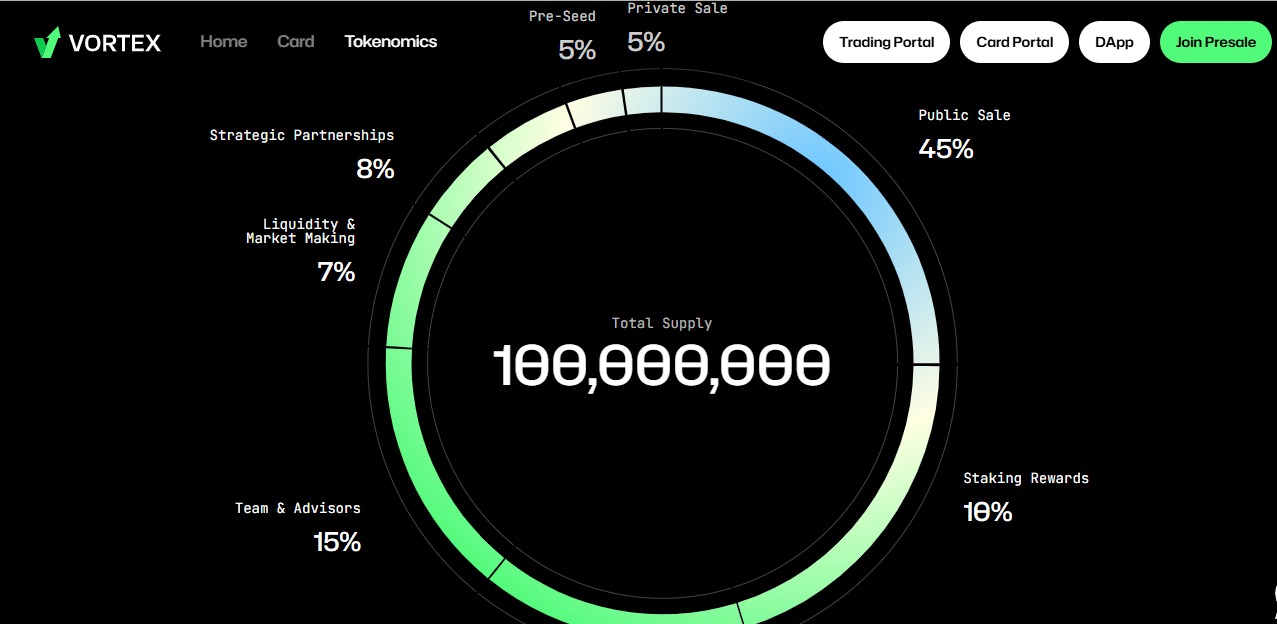
How VFX’s tokenomics are distributed. Source: Vortex FX
How the tokens are allocated shows where the team intends to direct the funds. Here’s a breakdown:
| Allocation | Percentage | Purpose |
| Public Sale (incl. presale rounds) | 55% | Early supporter access at discounted rates |
| Team & Advisors | 15% | Long-term team incentive with vesting |
| Staking Rewards | 10% | Incentives for token holders who stake |
| Strategic Partners | 8% | Growth initiatives, ecosystem expansion |
| Liquidity Pools | 7% | DEX and CEX market-making for trading |
| Treasury Reserve | 5% | Platform reserves and operational funding |
Safe Buying Tips to Avoid Scams When Buying VFX
Presale scams are common, so you have to be careful and protect yourself. Here’s how to invest in VFX in the right way:
Bookmark the official website immediately. Don’t trust search engines or social media links. Type it in carefully the first time, ensure you’re on the right site, and bookmark it.
Always check multiple official channels before sending funds. Check the presale contract address on X (Twitter), Telegram, and the official website. They should all match.
Never approve unlimited token spending. When you connect your wallet, it will ask for permission to access your tokens; some will ask for unlimited access. Never allow this.
Use the burner wallet concept for new presales. It is worth it to create a separate wallet just for presale participation and only keep enough funds needed in that wallet.
Don’t make decisions based on FOMO. Scammers use countdown timers to create a sense of scarcity or place a ‘last chance’ message across the image. Legitimate presales will provide you enough time to think before you jump in.
Check for smart contract audits. Not foolproof, but if a reputable firm has audited the code (CertiK, PeckShield), it shows the code has at least been reviewed for glaring issues.
Join official community channels. Real communities will discuss the good and bad aspects. If criticism is banned, watch out.
How and When to Claim VFX Tokens
Your VFX tokens are locked in the presale contract until the official TGE; you can’t access/transfer them before that.
When TGE happens, you will need to:
Go back to the official presale website
Connect the same wallet you purchased tokens with
Go to the dashboard and look for a “Claim” button
Click to get the process started
Approve the transaction in your wallet
Wait for blockchain confirmation
The tokens will then appear in your wallet. If they don’t, you can add the VFX token contract address to your wallet.
If you staked, then your tokens might have a different lockup period, and there is no distinction between locked and unlocked tokens in the app. This also depends on the staking terms you agreed to. Check the staking details for your specific rewards and unlock schedule.
Some presales are also distributed in stages. The exact claiming process and whether any distribution is planned will be announced by the project before TGE. So, watch out for the upcoming ICOs calendar and stay updated on any changes that could affect VFX launch date.
Troubleshooting – Common Issues When Buying
Wallet Won’t Connect
This usually happens when browser extensions conflict. Turn off all wallet extensions you have installed, and refresh the page. On mobile, use the in-app browser in your wallet app instead of Safari or Chrome.
Not Enough Gas
You’re seeing this error because you don’t have enough ETH to pay transaction fees. Even if you have enough USDT or USDC to buy VFX token, you need extra ETH for gas. Buy more ETH and try again. On BNB Chain, you need BNB for gas instead.
Transaction Stuck on Pending
Network congestion can delay transactions. Confirm your transaction on Etherscan (for Ethereum blockchains) or BscScan (for BNB chain) using your transaction hash. If it’s still pending after 20 minutes, you should speed it up by increasing the gas fee. Your wallet should have an option to “speed up” or “cancel” pending transactions.
Wrong Network Selected
If you’re trying to buy with ETH but your wallet is on BNB Chain, the transaction won’t work. Check which network you’re connected to in your wallet. The presale site usually shows which network you need. Switch networks and try again.
Tokens not Visible after Purchase
Presale tokens don’t appear in your wallet until after TGE when you claim them. The presale dashboard should show your purchased amount. If you want to track your transaction, copy your transaction hash from your wallet history and paste it into a blockchain explorer.
Conclusion – Should You Buy VFX?
Buying VFX is a simple process for anyone familiar with crypto wallets and basic transactions. You create a wallet, fund it, visit the presale site and purchase your VFX tokens.
Whether you should buy or not depends on your due diligence and risk tolerance. VFX positions itself as an infrastructure project that connects the forex and crypto markets. This is a different type of value proposition from many presale tokens.
However VFX remains an early-stage cryptocurrency project, and no presale investment is guaranteed. You risk capital with any early-stage token investment, including the risk of a 100% loss.
Remember that VFX forecast and price predictions are speculation, as are future exchange listings. So, do your own research, read the full project documentation and understand what you’re buying and why.


